Premium WordPress Header Builder
The header your WordPress site deserves.
WordPress site
Premium WordPress header builder without touching code. Create responsive navigation, sticky headers, mobile panels, CTA layouts, and preset-based header designs directly inside WordPress using one clean control system.
What’s include
Everything a header needs. Nothing it doesn’t.
A modern WordPress header builder should do more than display a logo and menu. It should support responsive layouts, sticky behavior, clear call-to-action placement, mobile usability, dark mode compatibility, and flexible preset control without slowing down your site.
Sticky header
CSS-based position: sticky with no JavaScript dependency, lower layout shift risk, and clean theme compatibility.
Zero JS overhead
Day / night toggle
Adds a sun/moon switch that works with your dark mode class strategy and keeps the experience polished for visitors.
Dark mode ready
DU
Dual logos
Upload separate light and dark logos for a more premium visual result across all major breakpoints.
4 breakpoints
Configurable CTA
Set your own CTA label and URL for a landing page that can move directly from demo to conversion without edits in code.
Easy conversion
MO
Mobile dropdown panel
Keyboard-friendly mobile navigation, chevrons, focus handling, and smoother behavior across modern devices.
WCAG minded
PA
Per-page disable
Turn the header off on individual pages where a clean landing page or campaign layout needs full control.
Post meta
Export / import / reset
Move settings between staging and production with less friction and a more reliable workflow for agencies.
Staging friendly
Accessibility first
The interaction model is built to feel smoother, clearer, and more dependable for keyboard and assistive tech users.
Accessible UX
ME
Mega menu friendly
Designed to sit more comfortably beside larger navigation systems and premium menu layers without feeling fragile.
Drop-in compatible
Built-in presets
Start in seconds. Refine from there.
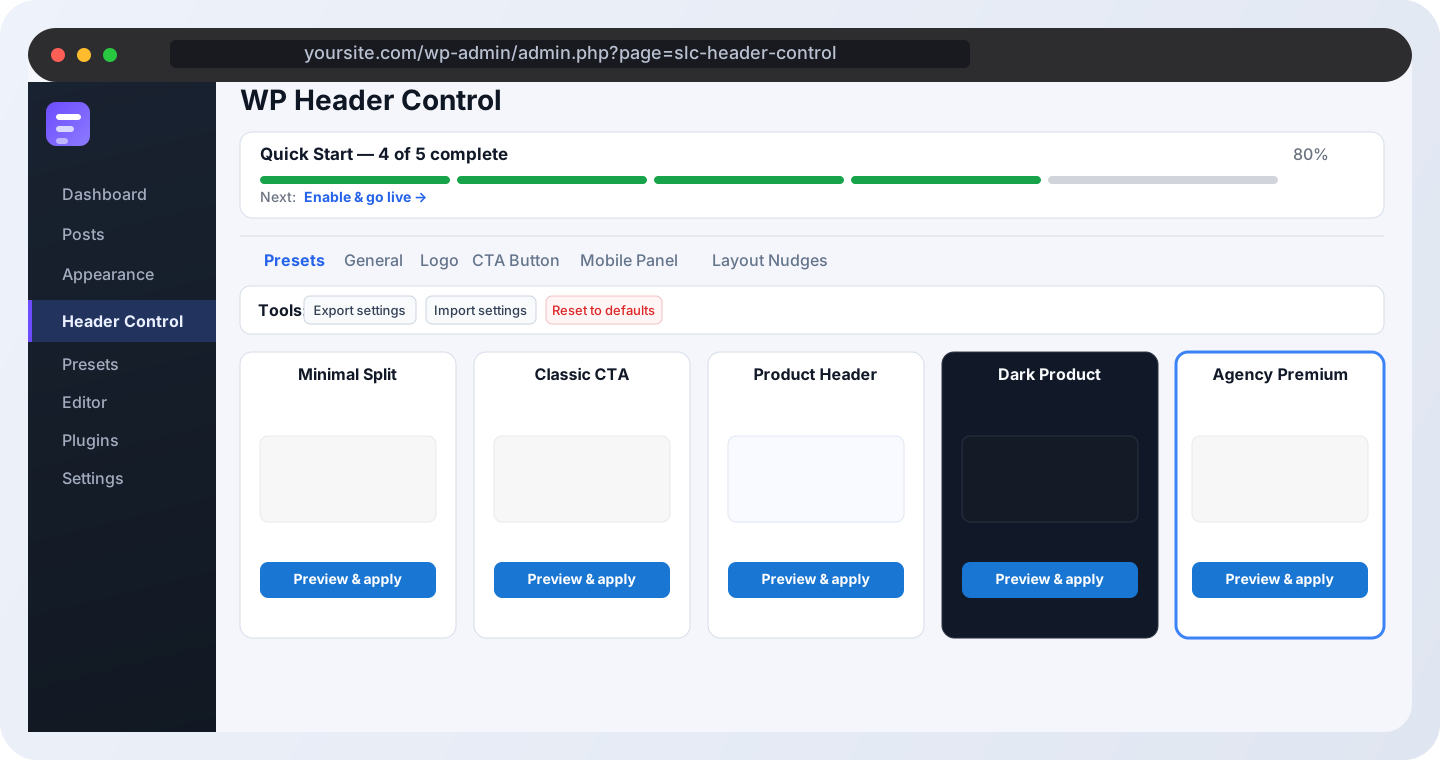
Five responsive preset directions with clearer visual identity and a cleaner premium feel right from the start. perfect wordpress header builder
Minimal
Small centered logo, no CTA, no toggle. Clean and quiet.
No CTANo toggle
Get Started
Classic
Logo left, nav center, CTA right. Standard professional layout.
CTA rightToggle
Request Quote
Bold
Larger logo, stronger CTA area, and a more assertive product feel.
Large logoSticky feel
Get in Touch
Dark Product
A darker product-led direction with a clearer contrast story and a more premium SaaS look.
Dark modeHigh contrast
Request Quote
Agency Premium
Balanced, polished, and built for agencies that want a confident premium feel without clutter.
AgencyPremium feel
Visual showcase
See How a Premium WordPress Header Builder Looks Before You Publish
Preview structured header layouts before activation. Each preset is designed to give you a real starting point instead of empty placeholders, so you can launch faster and refine only what matters.
Setup
Up and running in four steps.
No theme file editing. No shortcodes to paste. Just install, configure, and go live.
1
Install and activate
Upload the plugin, activate it, and open the landing page settings from the admin area.
2
Pick a preset direction
Choose the layout language that best matches your brand and keep polishing from there.
3
Add your visuals
Upload preset visuals and the large showcase image so the page feels premium and tailored.
4
Set CTA and publish
Update the main CTA label and URL, then drop the shortcode onto the live page.
✓Plugin activatedComplete
✓Preset direction selectedComplete
✦Showcase image uploadedIn progress
→CTA wired to checkoutPending
Save settings
Preview page
For developers
Extend without forking.
Flexible enough for client work, clean enough to still feel premium on the frontend.
filter
slc_hc_header_html
Modify or replace the complete header markup before it is output.
add_filter( ‘slc_hc_header_html’, function( $html, $opts ) {n return ‘…’ . $html;n}, 10, 2 );
filter
slc_hc_cta_html
Replace the CTA markup entirely and connect it to custom logic or commerce actions.
add_filter( ‘slc_hc_cta_html’, function( $html, $cta ) {n return ‘Book a call’;n}, 10, 2 );
action
slc_hc_before_header
Output content before the header for notice bars, skip links, or custom branded additions.
add_action( ‘slc_hc_before_header’, function() {n echo ‘Free shipping this week!’;n} );
filter
slc_hc_sanitize_header_options
Adjust option values before saving so larger builds can enforce standards programmatically.
add_filter( ‘slc_hc_sanitize_header_options’, function( $out ) {n $out[‘sticky_enabled’] = 1;n return $out;n} );
FAQ
Common questions, answered clearly.
The FAQ is now designed as a broader full-width section so it feels more premium and more intentional on larger screens.
Built to feel premium before purchase and reassuring after install, with practical answers about compatibility, updates, exports, and dark mode behaviour.Can I create a sticky WordPress header?Does it work with any WordPress theme?Can I build different mobile and desktop headers?Can I add CTA buttons inside the header?Will my settings survive a plugin update?Is the dark mode toggle compatible with my theme’s dark mode?Is it translation-ready?Is this better than editing header.php manually?
Ready to publish
Launch a cleaner, more premium header page.
Upgrade Your WordPress Header Without Rebuilding Your Theme. Use the best wordpress header builder today